![]() A.I. Wars
![]() Shareware ![]() R3D Player ![]() Screen Saver ![]() Armor Commander ![]() CAICLPro ![]() BattleShell ![]() Chinese ![]() |
|
| A.I. Wars (The Insect Mind) Updates |
NOTICE: THESE PATCHES ARE FOR USERS WHO PURCHASED A.I. WARS BEFORE FEBRUARY 2003. NO PATCH IS NECESSARY FOR COPIES PURCHASED BEYOND THAT DATE.
VERSION 5.6.3B IS THE MOST CURRENT VERSION
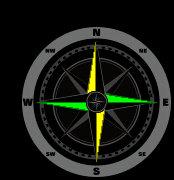
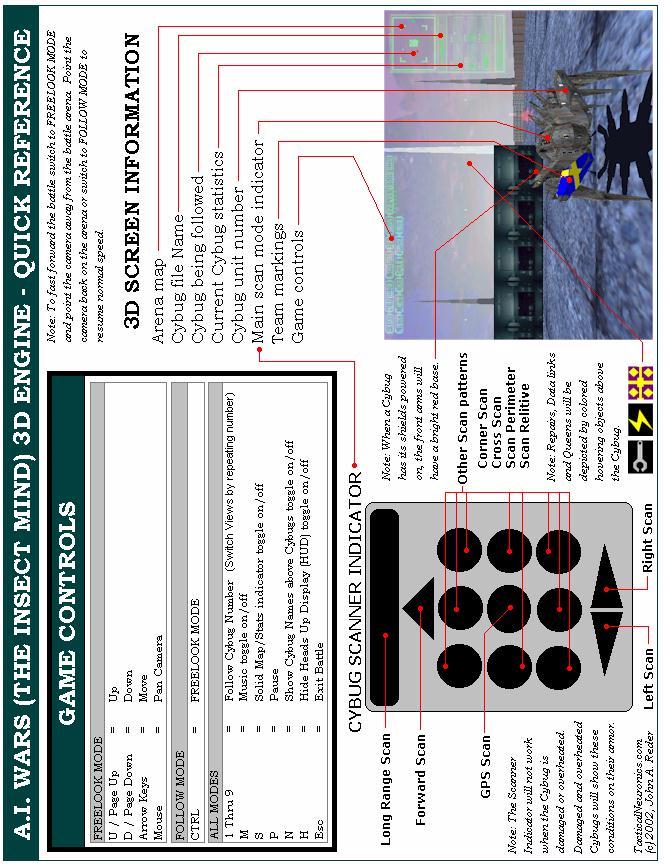
A.I. Wars registered version 5.0.5 to 5.0.6 patch (.3MB)This patch addresses a minor problem with reading the values of some system variables. Most Cybug developers do not use these and there is a simple workaround but I thought I'd patch it anyway. The follwing variables are fixed in v5.0.6: #overheatoff, #snodeoff, #smartclickoff, #bloodmodeon and #lastcybugon. The problem with these variables in version 5.0.5 was that they're returning " 0" or a " 1" instead of "0" or a "1" which offsets the parsed code. In order for it to work in v5.0.5 you'd have to do it this way: math v1 = #overheatoff + 0 if value ~v1 = 0 then goto checkheat if value ~v1 = 1 then goto forgetheat the math function strips of the leading space from the variable so can be used. A.I. Wars registered version 5.0.6 to 5.0.7 patch (.3MB)Download the latest A.I. Wars patch. It now allows 10 Cybugs to be loaded from a scenario (.scn) file. Older versions only allowed 9 preventing automated scripting any battles over 9 Cybugs - this limit has been lifted and you can now load 10 from a scenario! A.I. Wars registered version 5.0.7 to 5.5.3 patch (9.8MB)Come and get your very own copy of the new A.I. Wars for the 21st century! v5.5.3 (enhanced 3D battle simulator) is now here and it will blow your mind! A.I. Wars registered version 5.5.3 to 5.5.4 patch (.3MB)This small patch addresses a bug that has been present in all versions of A.I. Wars that used the 'cmath' command. Before the v5.5.3 3D upfgrade patch which in addition to adding the new 3D battle engine, replaced the CAICL editor with a new one that auto corrected/verified syntax. This new editor changed the case in all 'cmath' commands to 'CMath'. This innocent change actually caused the language parser to error on these cmath commands because it was looking for the string 'math' rather than 'Math' to update variables within the string with their true numeric values. This problem always existed but most users always used lowercase 'cmath' and since the editor didn't change the case before v5.5.3 nobody noticed the issue. This has been corrected and the cmath command is no longer case sensitive. A.I. Wars registered version 5.5.4 to 5.5.5 patch (.3MB)A problem with the new editor caused text to be lost under certain conditions and it was decided to roll back to the more stable editor found in v5.0 and release a more full featured stand-alone editor in its place. A.I. Wars registered version 5.5.5 to 5.5.6 patch (2.6MB)This patch address the following issues: The 2d Battles were starting to get too fast on the newer PC's so the battle speed control bar from the birds eye debug mode has been enabled for regular mode as well. This allows you to decrease the battle speed by moving the scroll bar to the right. A aiw_config.ini file was added to allow you to specify an external Cybug A.I. editor like CACCLPro or GVIM. Note: Ignore the Cybug and Map path settings in this ini file, a future patch will enable them properly. Other minor interface graphic changes were also made. A.I. Wars registered version 3D Engine patch 1.0.3 to 1.0.4 patch (.8MB)This is a 3D engine patch. You can verify your 3D engine version by looking at the text in the top left corner of your screen just before a 3D battle starts. This patch corrects some issues with the 3D graphics engine and increases Cybug speed A.I. Wars registered version 3D Engine patch 1.0.4 to 1.0.5 patch (.3MB)This is a 3D engine patch. You can verify your 3D engine version by looking at the text in the top left corner of your screen just before a 3D battle starts. This patch increases the speed of 3D battles by 500%! This patch also rotates flags by 45 degrees so they are easier to see as well as makes the mines look a little better. Some sounds were added to events that were previously silent. A.I. Wars registered version 5.5.6 to 5.5.7 / 3D Engine patch 1.0.5 to 1.0.6 patch (1.7MB)This is a Combonation patch it upgrades the main A.I. Wars program from v5.5.6 to 5.5.7 and the 3D Engine from 1.0.5 to 1.0.7. You'll need to make sure you have applied all previous patches to both engines before applying this patch. You can verify your current 3D engine version by looking at the text in the top left corner of your screen just before a 3D battle starts, it should read 1.0.5s. You can verify that your current version of the the main A.I. Wars program by looking in the lower left corner of the startup splash screen, it should read v5.5.6. This patch properly implements the 'aiw_config.ini' file allowing you to define storage directories for your Cubug .AI and your .MAP files. This patch enhances the 3D engine to display a new ending sequence for the highest scoring living Cybug placing it on a rising winner block while filling the battlefield with lava just before the sky goes dark... Other smaller issues with the editor and control layout were also addressed. A.I. Wars registered version 5.5.7 to 5.5.8 / 3D Engine patch 1.0.6 to 1.0.7 patch (.4MB)This is a Combonation patch it upgrades the main A.I. Wars program from v5.5.7 to 5.5.8 and the 3D Engine from 1.0.6 to 1.0.8. You'll need to make sure you have applied all previous patches to both engines before applying this patch. You can verify your current 3D engine version by looking at the text in the top left corner of your screen just before a 3D battle starts, it should read 1.0.6. You can verify that your current version of the the main A.I. Wars program by looking in the lower left corner of the startup splash screen, it should read v5.5.7. This patch fixes an error message sometimes issued with saving edited maps. It also fixed a bug when saving a Cybug under a new name using the editor button from the start splash screen, it wasn't changing the edit window name to reflect the new file name. This patch fixes an issue with the 3D engine where the shadow of a Cybug is not removed when it self destructs. A.I. Wars registered version 3D Engine patch 1.0.7 to 1.0.8 patch (.4MB)This is a 3D engine patch. You can verify your 3D engine version by looking at the text in the top left corner of your screen just before a 3D battle starts. This upgrades the overheat and damage Cybug skins so they look a little more realistic. I also made mines more easy to see as well as improved upon some other smaller battle sequences. A.I. Wars registered version 5.5.8 to 5.5.9 / 3D Engine patch 1.0.8 to 1.0.9 patch (1.5MB)This is a Combonation patch it upgrades the main A.I. Wars program from v5.5.8 to 5.5.9 and the 3D Engine from 1.0.8 to 1.0.9. You'll need to make sure you have applied all previous patches to both engines before applying this patch. You can verify your current 3D engine version by looking at the text in the top left corner of your screen just before a 3D battle starts, it should read 1.0.8. You can verify that your current version of the the main A.I. Wars program by looking in the lower left corner of the startup splash screen, it should read v5.5.8. This patch adds some new features: Team Cybug Armor Markings in 3D Battles. This makes it easier to identify which Cybugs are friends and which are enemies. When friendly Cybugs are enabled they will wear markings to indicate which Cybugs have the same IFF code. Scanner activity indicators in 3D battles. Now you can watch a Cybug that is being followed and see which scans it is conducting by looking at the lights on its armor. Click Here to get your A.I. Wars 3D Quick Reference Card A.I. Wars registered version 5.5.9 to 5.6.1 / 3D Engine patch 1.0.0 to 1.1.0 patch (.7MB)This is a Combonation patch it upgrades the main A.I. Wars program from v5.5.9 to 5.6.1 and the 3D Engine from 1.0.9 to 1.1.0. You'll need to make sure you have applied all previous patches to both engines before applying this patch. You can verify your current 3D engine version by looking at the text in the top left corner of your screen just before a 3D battle starts, it should read 1.0.9. You can verify that your current version of the the main A.I. Wars program by looking in the lower left corner of the startup splash screen, it should read v5.5.9. This patch improves Windows XP compatability and updates the help file. A.I. Wars registered version 3D Engine patch 1.1.0 to 1.1.1 patch (.2MB)This is a 3D engine patch. You can verify your 3D engine version by looking at the text in the top left corner of your screen just before a 3D battle starts. This patch adds 4 new camera positions in Cybug follow mode. The camera angles will Cycle each time you choose the Cybugs number. This patch fixes issues with the Radar where ghost Cybugs would appear in the top left corner on the scope. This patch also adds a feature to the follow mode where upon a followed Cybugs death the focus will switch to the highest scoring living Cybug. This will also happen if you select a dead Cybug that has no flag on the battlefield. This patch resolves most of the the error 99 conditions related to the disabled strategy node. A.I. Wars registered version 3D Engine patch 1.1.1 to 1.1.2 patch (.2MB)This is a 3D engine patch. You can verify your 3D engine version by looking at the text in the top left corner of your screen just before a 3D battle starts. This patch squashes all known error 99 conditions. This patch orients the top camera views so they are alligned with the radar map. This patch adds a northern point marker so you can quickly determine your camera orientation with the position of the radar map. A.I. Wars registered version patch 5.6.1 to 5.6.2 patch (.3MB)This is a patch to the Main AI_WARS.EXE file. You can verify your version of A.I. Wars by looking at the version number in the lower left corner of the title screen or by right clicking on the AI_WARS.EXE file and choosing properties then selecting the version tab. This small patch squashes all known error 163 conditions and relates to issues users were having using the command line parameters to launch 3D battles. A.I. Wars registered version 3D Engine patch 1.1.2 to 1.1.3 patch (3MB)This is a 3D engine patch. You can verify your 3D engine version by looking at the text in the top left corner of your screen just before a 3D battle starts. This patch squashes all known error conditions caused by self destruct sequences and double Cybug death. A.I. Wars registered version patch 5.6.2 to 5.6.3 patch (1MB) A.I. Wars registered version patch 5.6.2 to 5.6.3 patch - alternate - use this if the first one has problems patching (1MB)This is a patch to the Main AI_WARS.EXE file. You can verify your version of A.I. Wars by looking at the version number in the lower left corner of the title screen or by right clicking on the AI_WARS.EXE file and choosing properties then selecting the version tab. This minor patch fixes left behind hovering missile issue in 3D battles when missiles are fired and shields are up and Cybug is killed. A.I. Wars 3D Engine Missing Texture BitmapThis is a file that is necessary to prevent Error 10's from happening in the 3D engine when displaying battles on the world background theme named 'Soranon V'. Simply copy this file named into your installed A.I. Wars directory to correct this issue. A.I. Wars registered version patch 5.6.3 to 5.6.3b patch (1MB)This is a patch to the Main AI_WARS.EXE file. You can verify your version of A.I. Wars by looking at the version number in the lower left corner of the title screen. This minor patch allows A.I. Wars to remember the last used sound setting after restart. Prior to this A.I. Wars always started with MIDI selected which causes 2D battles to run slow on some Win2k and XP systems. |