|

Return to Tactical Neuronics (Home of A.I. Wars - The Insect Mind)

Shareware version available here
Program your own Cybug and put it into a battle simulator to see how it does against other Cybugs.
Cybug developers wanted, click here for details!
Simple Fresnel Lens is used to enhance 3D gaming experience
This is how I managed to upgrade my 17" Monitor to a 30" monitor for under $10.00!
(This can be applied to any size monitor.)
A quote from someone who tried this out:
"Your fresnel lens screen enlarger took some serious heat on /. but I decided to give it a shot anyway. FANTASTIC!!! I spent a grand total of $8.09 to take my 15" monitor up to a 28" (est.) monitor with the added benefit of 3-D effects. My image quality did not suffer either. So much for the naysayers." Walt Schroeder, via the internet
(Try this with A.I. Wars (The Insect Mind) in 3D Mode!)
Item | Retrieved from | Cost |
Flat black spray paint | local hardware store | $2.95 |
8" x 11" Fresnel Lens (full page magnifier) | Local book store, or get one from the base of an old overhead projector. You can also order larger ones with better quality from scientific catalogs or overhead projector manufacturers for about $30.00. | Bookstore floppy variety $6.00, Bookstore .25" thick solid variety $7.99 |
Glue/Tape | Corner store | $.98 |
Expansion slot covers | Left over from adding PCI cards | Free |
Cardboard box | Found in garage | Free |
A Fresnel Lens has the same properties as a normal lens. Fresnel (pronounced fre'nel) comes from the name of its inventor the French physicist Augustine Fresnel (1788 to 1827). Fresnel lenses got their start in lighthouses back in 1822. Fresnel lenses can be found today in many places like the rear windows of trucks and vans, traffic signals, car headlights and in overhead projectors. A Fresnel lens is a flat lens that obtains the magnification properties of a regular lens by using stepped geometry to create the surface characteristics of a normal glass lens without actually changing its thickness. It does this by having many rings originating from its center each ring has a surface that slightly changes to imitate the exact angle of a true lens. The overall effect is a flat, cheap and lightweight lens.
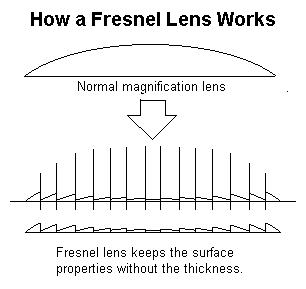
Now what could this simple piece of science do for us gamers, you ask? Well, in a word, immersion. Immersion is something that we all look for when playing a video game, and with today's large monitors, 3D accelerators and 3D sound, we have been doing everything that we possibly can, to get every last ounce of immersion out of our systems. We spend hundreds of dollars for the latest video cards and possibly thousands of dollars for the largest monitor that we can afford.
What if I told you that you could expand your current monitor to fill your visual horizon and trick your eyes into believing that you are looking several feet into the picture instead of at it, for only a few dollars? You can!
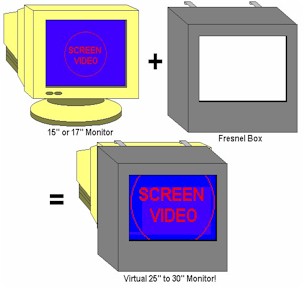
A FRESNEL LENS BOX is a simple and inexpensive device that you can build yourself. It is simply a cardboard box that surrounds your monitor and holds a Fresnel lens in place suspended about six inches in front of your monitor. You can find these lenses in your local book store under the name 'Full page magnifier'. Don't ask for a Fresnel lens, you may get a strange look from the flunky behind the counter. Other good sources for higher quality Fresnel lenses are science catalogs and places that sell replacement parts for overhead projectors.
I built my Fresnel lens box a few months ago and I have to tell you, there is no going back! It makes my 17" monitor look like a 30" monitor and I have the sore neck and bad posture to prove it!
How do you make one you ask, well its simple, follow these instructions and you'll be on your way to gaming bliss.
Materials needed: cardboard, Fresnel lens, black paint, cutting blade, tape or glue.
1.) Get yourself about one square yard of cardboard.
2.) Get a Fresnel lens, I don't care how you get it, that's your business.
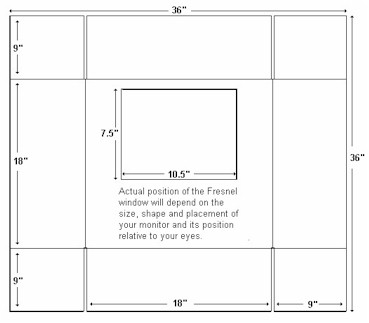
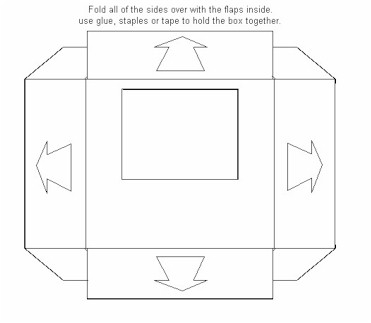
3.) Use the diagrams below to make the necessary cuts and folds to the box.
4.) Paint the box flat black to cut down on any glare from the screen and surrounding light sources.
5.) Mount your Fresnel inside of your box using anything you can find that will hold it in place. I used cardboard and glue to make corner mounts that firmly hold my lens into place. The mounting really depends on the lens that you have. Some lenses are flimsy and could be held with tape, others are thick and heavy, so you will need to make some kind of mounts out of cardboard or double sided tape.
6.) Mount the Fresnel Lens Box on the front of your monitor so that the lens is positioned about 6 inches in front of your screen. Use whatever resources that you have to insure that your screen and lens are situated in such a way as to allow you to look through the lens and see your entire screen. You will notice that you will be placing your face really close to the lens and you may actually have to move your head to look up and down at the four corners of the screen.
Note: for best results you should turn off the lights to cut down on any external glare that may reflect off of the lens surface. If you can't see your keyboard, you can cut an opening on the bottom of your lens box to allow the light from your monitor to illuminate your keyboard.
These instructions should get you on your way to having the coolest 3D enhancement since 3D glasses and if you really want to go for that total immersion experience, you could integrate this into a virtual cockpit surrounding you with controls, padding, sounds and cool lighted gizmos, but hey, that's another article.
Warning: some users of this device complain of dizziness and headache so use this at your own risk. In other words, if normal 3D games make you sick, then you better stay back on the porch with the puppies playing pong.
This is how the Fresnel box looks
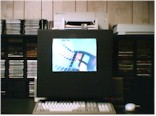
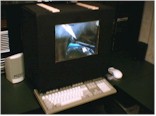
Note: To see your entire screen you will need place your face close enough to the
Fresnel lens to look through it and peer at your monitor which will appear very large. You will now have the illusion of actually looking through your screen into 3D space and your eyes will focus about 5 feet in front of you.
WARNING: Once you start using this you will never be able to go back to your
boring 2D flat monitor again!
This is how the Fresnel box is assembled
Note: Create the cardboard box and hooks so that the lens is at least 4" or 6" from the monitor. 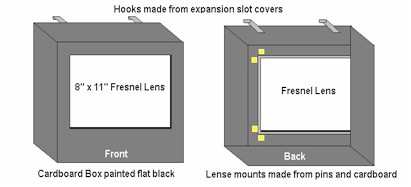
|
|
 
Fortress of Flags

GameBoy Advance

Atari
Vectrex
Adventure Stidio
Retired Games
One-Switch
Home Arcade
Articles
|